ISNUMBER and VBA IsNumeric are not interchangeable. In current Excel versions, ISNUMBER checks whether Excel already treats a value as numeric in the worksheet, while VBA IsNumeric checks whether an expression can be evaluated as a number.
That difference matters when you are cleaning imported data, validating user input, or looping through cells in VBA. A quoted number such as "19" is the simplest example: ISNUMBER("19") returns FALSE, but IsNumeric("19") returns True.
If you want a quick worksheet reference first, see the ISNUMBER function page. If your real problem is preventing hidden spaces and bad entries before they reach a formula, the data-validation pattern in this Excel Tables guide is also worth using.
What ISNUMBER does in current Excel versions
ISNUMBER(value) returns TRUE only when the tested value is already numeric in Excel. That includes standard numbers and valid Excel date or time serial values, because Excel stores those as numbers underneath the formatting.
Microsoft currently documents that behavior for Excel for Microsoft 365, Excel for Microsoft 365 for Mac, Excel for the web, Excel 2024, Excel 2024 for Mac, Excel 2021, Excel 2021 for Mac, Excel 2019, and Excel 2016.
For example:
=ISNUMBER(19)returnsTRUE=ISNUMBER(A1)returnsTRUEonly ifA1is numeric=ISNUMBER(TODAY())returnsTRUE=ISNUMBER("19")returnsFALSE=ISNUMBER("19 hours")returnsFALSE
Microsoft's IS function documentation also notes that these functions do not coerce values before testing them. That is why ISNUMBER("19") stays FALSE instead of converting the text to a number first. You can see the same behavior documented in the Microsoft Support IS functions reference.
Why ISNUMBER("19") returns FALSE
This is the part that trips people up most often. In many Excel formulas, quoted text that looks numeric can be coerced into a number during calculation. ISNUMBER does not do that test.
So if cell A2 contains an apostrophe-number such as '19, or imported CSV text that looks like 19, this formula still returns FALSE:
=ISNUMBER(A2)
That is usually the right behavior, because the goal of ISNUMBER is to tell you how Excel currently stores the value, not how Excel might convert it later.
If you need to identify the underlying type of a value in a worksheet, the older TYPE function article can also help when you are troubleshooting text versus numeric content.
How VBA IsNumeric is different
VBA IsNumeric(expression) asks a different question: can this expression be evaluated as a number?
This comparison applies to desktop Excel with VBA on Windows or Mac. Excel for the web supports ISNUMBER in formulas, but it does not run VBA macros.
According to Microsoft Learn, IsNumeric returns True when the entire expression is recognized as numeric, and False when it is not. It also returns False for date expressions. See the official VBA IsNumeric documentation.
That leads to behavior such as:
IsNumeric(19)      ' True
IsNumeric("19")    ' True
IsNumeric("19.5")  ' True
IsNumeric("19x")   ' False
IsNumeric(#1/1/25#)' False
If you specifically want worksheet-style behavior inside VBA, you can also call the worksheet version directly:
Application.WorksheetFunction.IsNumber(Range("A1").Value)
Microsoft documents that method separately in the WorksheetFunction.IsNumber reference.
Common edge cases: blanks, spaces, text numbers, dates, and errors
The difference between these functions becomes clearer when you look at the messy values users actually enter.
| Value | ISNUMBER(...) | IsNumeric(...) | Notes |
|---|---|---|---|
23 | TRUE | True | Both treat a real number as numeric. |
"23" | FALSE | True | Text that looks numeric is the main difference. |
| blank cell | FALSE | depends on what you pass from VBA | Test blanks explicitly in VBA logic. |
" " (space) | FALSE | False | A hidden space is still text, not a number. |
| valid Excel date in a cell | TRUE | n/a unless passed to VBA | Worksheet dates are stored as serial numbers. |
| VBA date expression | n/a | False | Microsoft documents IsNumeric as False for date expressions. |
#VALUE! | FALSE | n/a | Use error checks separately when needed. |
The original version of this post focused on hidden spaces and stray characters in user-entered data. That is still a real issue today. A cell that looks empty can contain a space character and break downstream formulas. In a worksheet, ISNUMBER is a good way to reject that kind of entry. In VBA, IsNumeric is broader and may accept text that you do not want to treat as a true worksheet number.
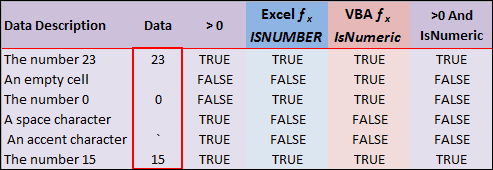
A safer VBA pattern when blanks must be excluded
The risky shortcut is to rely on IsNumeric alone and assume that means "safe numeric worksheet value." That is not specific enough when your range may contain blanks, text numbers, or imported strings.
When your VBA logic must reject empty cells and accept only numeric-looking values, use an explicit blank check:
If Not IsEmpty(cell.Value) And IsNumeric(cell.Value) Then
    ' continue with numeric logic
End If
When your VBA logic needs to behave more like the worksheet ISNUMBER function, call the worksheet function directly or convert the value first and then test the result.
When to use ISNUMBER and when to use IsNumeric
Use ISNUMBER when you are writing worksheet formulas, building validation rules, or checking whether Excel currently stores a value as numeric.
Use IsNumeric when you are in VBA and you want to know whether an expression can be evaluated as a number. That is a broader test, so do not assume it means the value is already a clean worksheet number.
If your goal is to stop hidden spaces and similar input problems before they spread through a model, combine this comparison with the data validation approach that uses ISNUMBER. That is often better than cleaning the problem later in a macro.