I usually put a name to each data table created for referencing information in in Excel, as in a Named Range. If you add data to the bottom of the table, the Named Range isn't modified and any reference to it will fail to include the new information.
Here's a table of data I stuck on a worksheet called MyData and the range A2:E10 is named myFoodData.
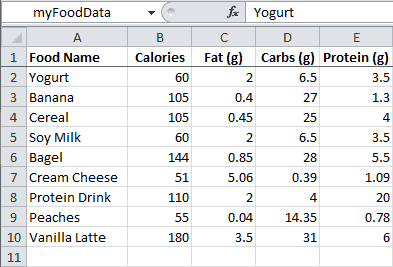
Inserting a row inside this range will automatically expand the reference for the Named Range, but normally a user would add data to bottom of the table in the first empty row.
My solution is event based. I write a simple subroutine.
Sub ShiftRangeAndRename() Const n As String = "myFoodData" Dim rng As Range Set rng = Range(n).CurrentRegion Set rng = rng.Offset(1, 0).Resize(rng.Rows.Count - 1, rng.Columns.Count) rng.Name = n End Sub
Then reference it from the deactivate routine on the MyData worksheet.
Private Sub Worksheet_Deactivate() Call ShiftRangeAndRename End Sub
When a user goes to the MyData worksheet and updates data and returns to the main worksheet, the worksheet deactivate routine calls the routine to update the range reference and its associated name. This also works if they are deleting data, but that's not common in this type of situation.