I'm new to the Excel 2008, the Mac version. Every time I open the program it just looks weird. What bothers me is that the default view is Page Layout. I guess it comes like that out of the box.
The regular Excel programs (Windows) are all setup with a Normal page layout as the default workbook setting. In all the years I've used Excel I've never thought a thing about what a spreadsheet view should look like until opening Excel 2008:mac for the first time.
To "normalize" things for me, I changed the default workbook setting in Excel 2008 from Page Layout to Normal. Now when I open the program, it looks a little more, well, normal to me.
Here are the steps to change the default workbook settings from page layout view to Normal view in Excel 2008.
- Open Excel 2008:mac
- Select the menu Excel » Preferences » View
- In the Settings section, under Preferred view for new sheets: select Normal
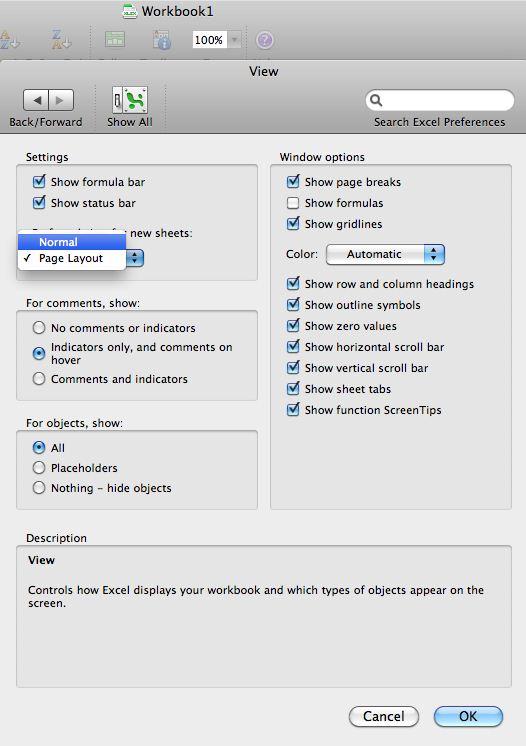
All new sheets will now appear with the Normal view. Check this out by clicking the plus (+) next to the last worksheet tab to insert a new sheet.
The next time you open Excel 2008 it will look a little more normal.