I recently exported an iPod playlist to check the total duration of time for all songs, but found the unit of time to be in seconds. For example, 274 seconds is not a useful time format for song duration. Converting this to a minutes:seconds format is my task.
Getting minutes is easy, just divide 274 seconds by 60 seconds per minute to get 4.567 minutes. However, I just need the integer portion and not the fractional part. There are several formulas that will do this: QUOTIENT, ROUNDDOWN, and INT Functions come to mind.
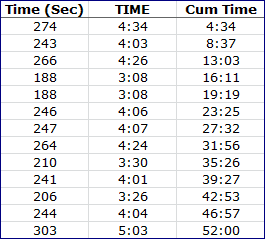 To capture the fractional part and convert to minutes the INT Function can be used with a some effort, but the MOD Function does the trick more efficiently.
Providing minutes and seconds to the TIME Function gives each song duration a proper time format (with a cell formatting change). Using the SUM Function, in another column, will give a cumulative time for all songs in the playlist.
My next several posts will cover these functions and put everything together step by step.
/images/posts/2010/Time-in-Seconds-Data.png