Back to articles
Advanced
2011-05-042 min read
#vba

Select One Column of Data with VBA

Let's assume you aren't using an Excel Table, List Object, or List for your data table and you want to select the data in only one column, which means the Header row is excluded. This can be simple if there's data in every row of the column, but what if that's not the case?
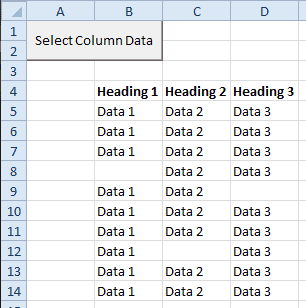
Select Column Data in a List

And assume for the moment that the example above extends down several hundred, or even thousand rows. I would get tired of manually selecting the data in a column by using the Ctrl+Shift+down arrow keyboard shortcut.

So I'd probably write some VBA code to handle this pesky task and link it to a button on the worksheet. Below is the VBA code. Sub SelectColumnData() Dim ac As Range Dim cr As Range Dim col As Integer Set ac = ActiveCell Set cr = ac.CurrentRegion col = ac.Column - cr.Column If cr.Rows.Count > 1 Then cr.Offset(1, col).Resize(cr.Rows.Count - 1, 1).Select End If End Sub

The active cell must be in the column you want to select when running this macro.
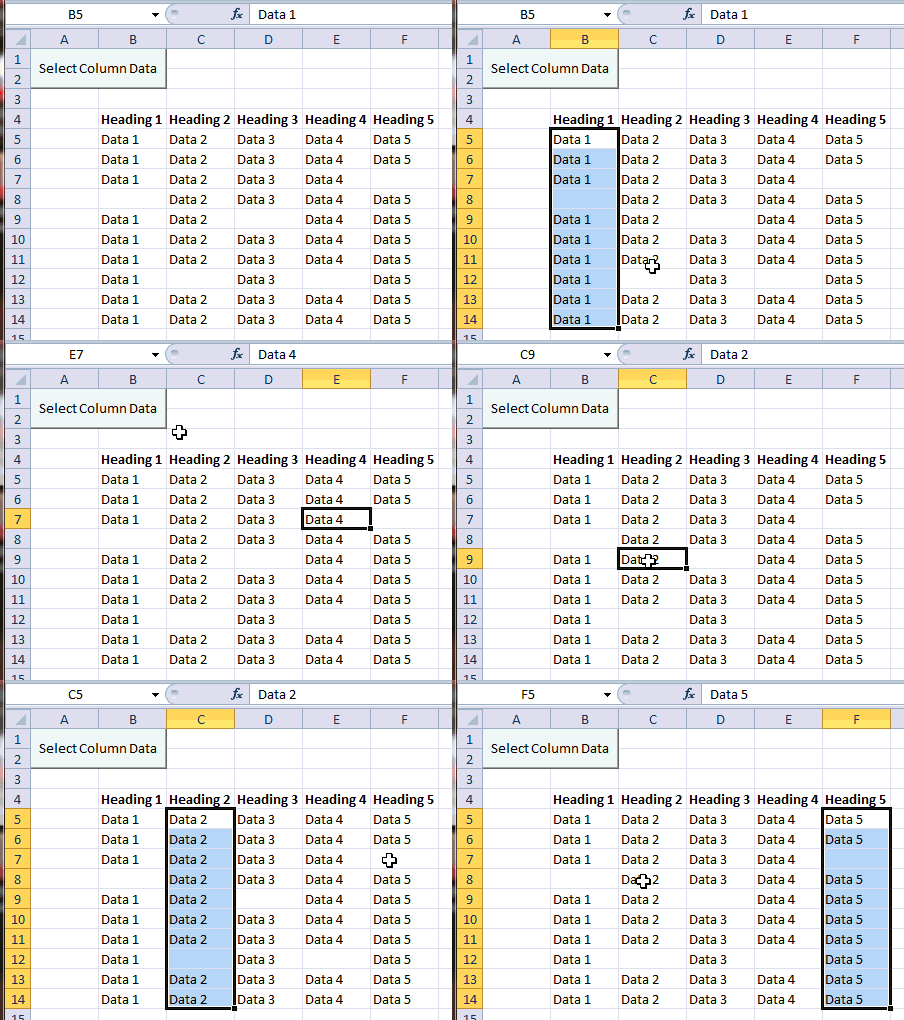
Select Column Data

To insert the button in Excel 2011, 2007 (Windows), I'm using a Form control by choosing Developer > Insert, selecting the Button icon, and drawing a button on the worksheet with the help of the Alt key to snap to cell borders. In Excel 2011 (Mac) choose Developer on the Ribbon then click the Button icon and draw a button on the worksheet. The alt/control key doesn't work to snap to gridlines.
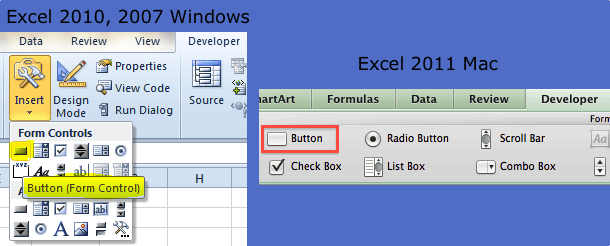
Excel Form Buttons

Then I rename the button and assign the macro.
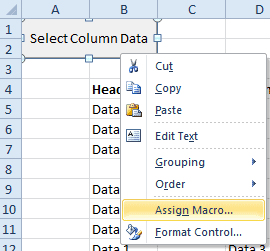
Assign Macro to Form Control

I can also assign a shortcut to the Macro instead of using a button, but the only issue with that is remembering what the shortcut is when I need to use the macro.

Enjoyed this guide?

Join our newsletter to get the latest Excel tips delivered to your inbox.

You can unsubscribe anytime. See our Privacy Policy.

Archived comments

Comments migrated from the previous version of the site. Adding new comments is disabled.

AbNovember 11, 2011 at 04:47 PM
Great tip! exactly what I was looking for
BobDecember 5, 2011 at 10:41 PM
This macro also works for Excel-2003 (Windows). Thank you Gregory -- this is a real time-saver.
Gregoryexcelsemipro.comDecember 6, 2011 at 01:58 AM
@Bob, I'm glad you think it's useful, I kind of like it myself.
PavelDecember 13, 2011 at 04:47 PM
Hi Gregory, What is I have data like this: 7 13 11 13 11 19 17 11 23 17 and I want select it all? How should I change the macro code? Thanks
Gregoryexcelsemipro.comDecember 20, 2011 at 03:05 AM
If you put a heading above the first numerical entry, this code will select the column of data. Sub SelectOneColumnData() ''''''''''''''''''''''''''''''''''''''''''''''''''''''''''''''' ' This routine will select a non-continuous column of data ' when active cell is located in the column heading. ''''''''''''''''''''''''''''''''''''''''''''''''''''''''''''''' Dim ac As Range Dim ws As Worksheet Dim lRow As Long Dim lc As Range Dim col As Integer Dim cr As Range ' Set active cell and row variables Set ac = ActiveCell col = ac.Column ' Get the last row of the worksheet, then ' set the last row in the current column lRow = ActiveSheet.Rows.Count Set lc = Cells(lRow, col) ' Find the bottom of the range in the current column, then ' re-set the last cell range Set lc = lc.End(xlUp) lRow = lc.Row ' Set the current range from the active cell to the last row ' in the column with data Set cr = ac.Offset(1, 0).Resize(lc.Row - ac.Row, 1) cr.Select End Sub