Back to articles
Beginner
2010-11-291 min read
#excel-2008#excel-2011#tips

Switch Between Relative and Absolute References in Excel for Mac

I'm a longtime user of Excel for Windows, but recently a newbie with Excel 2008 for Mac where I found that out the Windows shortcut F4 doesn't work to switch between relative and absolute references when editing a formula. Thankfully Excel 2011 has a Switch Reference toolbar icon on the Formulas Ribbon, as shown below.
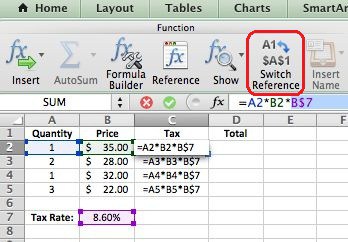
Switch Reference

Keyboard Shortcut in Excel for Mac

In trying to find a shortcut, I opened up Excel 2008 for Mac, went to the Help search bar, typed in "Excel Keyboard Shortcuts," and was able to find out that Cmd+T toggles the formula reference style between absolute, relative, and mixed.

So I go back to Excel 2011 for Mac and, lo and behold, ⌘+T works there as well.

Gotta love that keyboard shortcut list in Help. It's my new best friend in Excel for Mac. :)

Enjoyed this guide?

Join our newsletter to get the latest Excel tips delivered to your inbox.

You can unsubscribe anytime. See our Privacy Policy.

Archived comments

Comments migrated from the previous version of the site. Adding new comments is disabled.

HowardFebruary 15, 2012 at 01:39 AM
Thanks, this helped a lot.
Gregoryexcelsemipro.comFebruary 15, 2012 at 03:51 AM
Always glad to hear I'm making things easier for someone.
jeffwww.greenberginc.comMarch 20, 2012 at 03:07 PM
Thank you! This is my new favorite blog :) Sincerely, Frustrated Advanced Excel User New to Mac
HazelSeptember 28, 2012 at 07:53 PM
This didn't work for me - my Mac continues to make the error noise when I press the shortcut.
Gregoryexcelsemipro.comOctober 1, 2012 at 03:44 PM
I'm sorry. Perhaps there is a difference with keyboards that are not US.
DavidDecember 8, 2012 at 04:09 AM
Thanks so much for the tip on switch reference. I couldn't get it to work and moved over to my PC to finish my spreadsheet. Now, after reading your tip, I'm happily back on the Mac.
FundaJanuary 2, 2013 at 05:36 PM
This entry helped me save tons of time! I'm converting to Mac so struggling big time. Thank you so much.