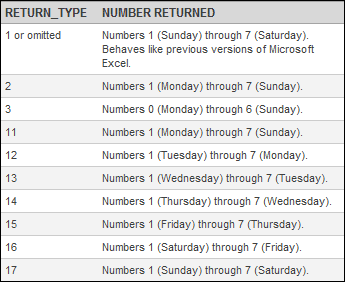
 Excel 2010 has new return_type arguments for the WEEKDAY Function. How useful they are is debatable, but you never know when you might come across a particular need.
Excel Weekday Function
The Excel WEEKDAY Function in has two arguments: serial_number and return_type. The serial_number argument is simply a number that represents a date. The return_type argument is optional, and assumed to be 1 if omitted.
Versions prior to Excel 2010 have only the first three return_type arguments: 1,2 3. The new arguments are 11-17, representing differing combinations for the starting day of the week.
The Excel WEEKDAY Function returns an integer value 1-7, based upon the day of the week, with the exception of return_type 3 that returns 0-6.
The Excel WEEKDAY Function Arguments dialog box doesn't show the new arguments.
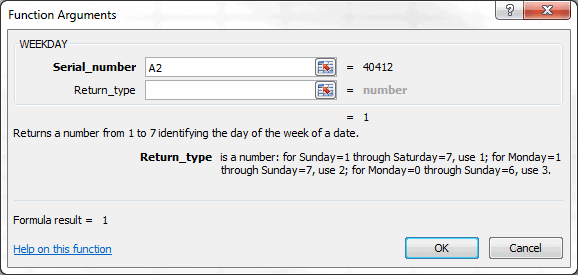
However in Excel 2010, when you enter the WEEKDAY Function into a cell, they are shown as you enter the second argument.

Weekly Reporting and the Excel WEEKDAY Function
I've only used the WEEKDAY Function with regards to reporting data, and then only sporadically.
Companies normally have weekly reporting requirements. However, while every week has seven days, there are two important distinctions. First is the start and end days of each week. Some companies use a Sunday-Saturday week, others a Monday-Sunday. These two are the most common, although I came across one company that had a Saturday-Friday reporting week.
The second distinction in weekly reporting is what day is used to represent the entire week. In the USA it's common to use a week-ending date for weekly reports, while in Europe a week-commencing date is used quite frequently.
I won't go into specific uses of the WEEKDAY Function for reporting in this post, but the two distinctions mentioned for weekly reporting make it a handy function to know.