Back to articles
Beginner
2011-01-032 min read
#excel-2003#excel-2007#excel-2008#excel-2010#excel-2011#tips

What Version of Excel am I Using?

If you're curious about the version of Excel you're using and don't know how to go about it, you've come to the right place. It could be as simple as selecting the Help Menu and clicking About Microsoft Office Excel, but then again, maybe not. The five options below will help you sort things out.

Excel for Windows

If you're using a Windows computer, chances are you're using one of the three most recent versions of Excel.

Excel 2003

Select the Help menu, then click About Microsoft Office Excel.
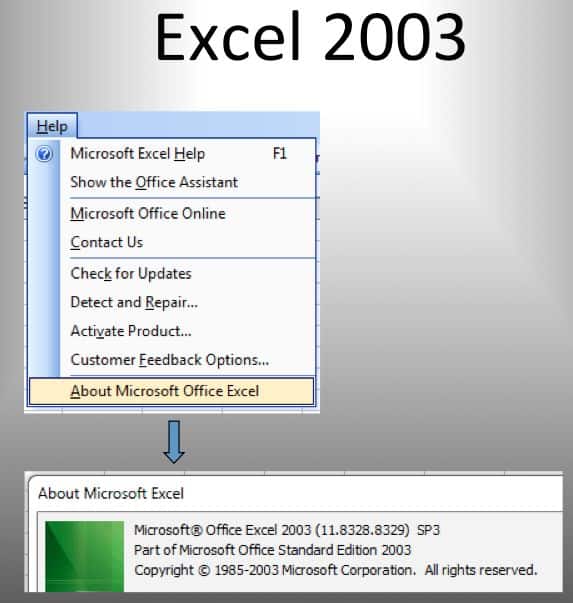
About Excel Versions 2003

This also works with earlier versions of Excel (2002 and 2000).

Excel 2007

Select the Office button and click the Excel Options button, then select Resources from the left-hand pane and click the About button.
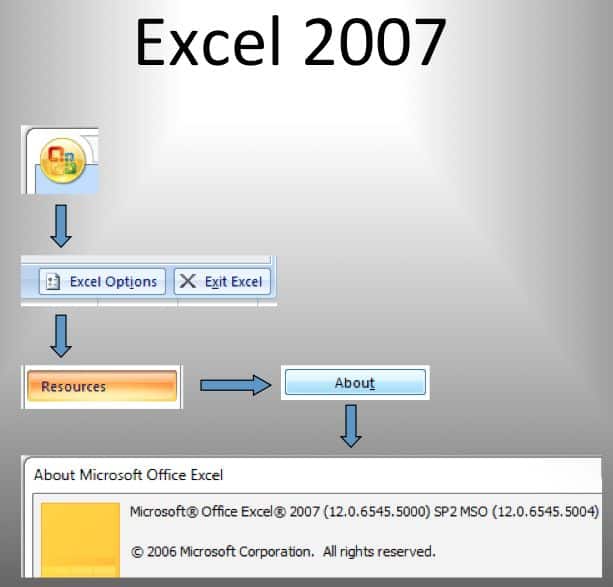
About Excel Versions 2007

Excel 2010

Click the File tab on the Ribbon, then select Help from the left-hand pane. The right-hand pane has the Version information.
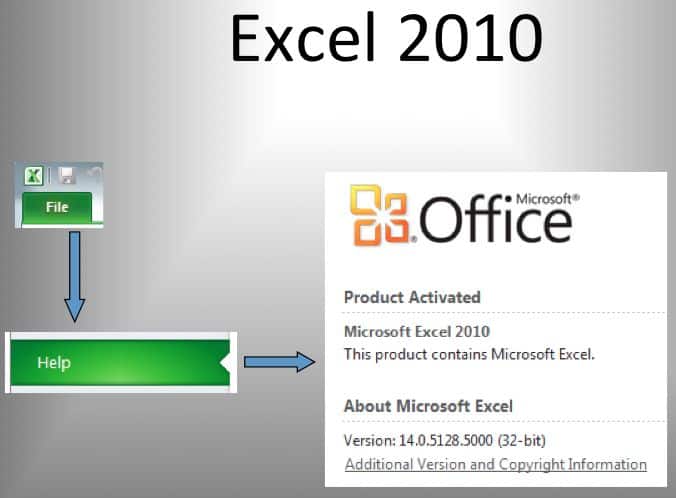
About Excel Versions 2010

Excel for Mac

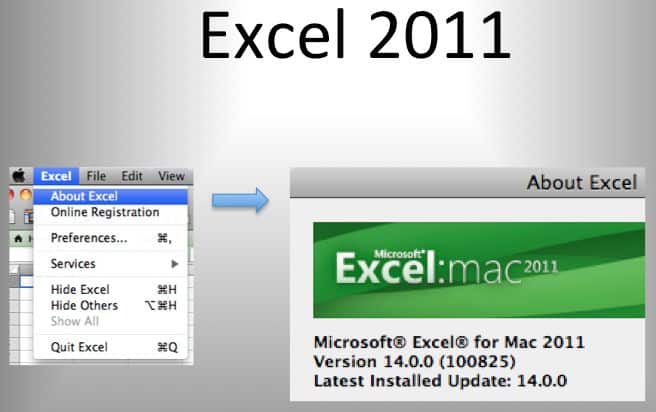
If you're using a Mac the two most recent Excel versions, 2008 and 2011, just select the Excel menu, then click About Excel.

Excel 2008
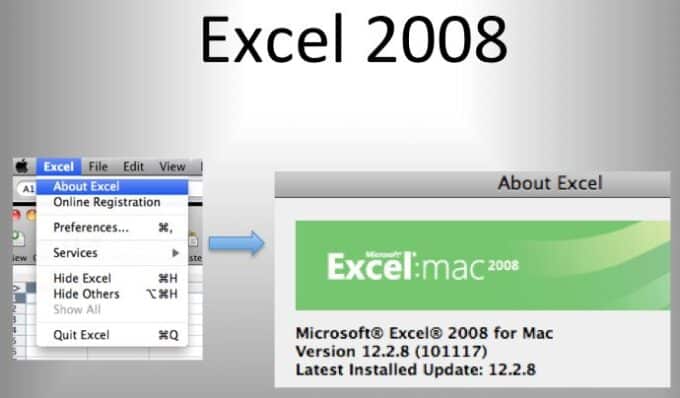
About Excel Versions 2008

Excel 2011

About Excel Versions 2011

Enjoyed this guide?

Join our newsletter to get the latest Excel tips delivered to your inbox.

You can unsubscribe anytime. See our Privacy Policy.

Archived comments

Comments migrated from the previous version of the site. Adding new comments is disabled.

MaxNovember 28, 2011 at 01:35 AM
Fantastic explenation. I don;t know why other websites make it so difficult to follow the explenations.
Clarence WilliamsSeptember 2, 2012 at 09:29 PM
As is so often the case with Microsoft the explanation of the program does not jibe with how the program actually functions. When I go to "About Excel" I am not told whether or not I'm using "Excel 2008 for Mac" or "Excel 2011 for Mac." Instead I'm told I'm using "Excel X for Mac." So, what actually appears in the program is totally different from what appears in the above explainations. Why is it so difficult for programmers and those discussing programming to use consistent vocabulary so that users are not left lost and guessing. It's really rather lazy. And for users it's very annoying.
Gregoryexcelsemipro.comSeptember 2, 2012 at 09:47 PM
I would submit that programmers operate in a parallel universe that sometimes intersects with the reality that us users inhabit. That being said, when I choose Excel > About Excel I get a pop-up window that shows an icon at the top: Microsoft Excel: mac 2011, and then the first text line is: Microsoft Excel for Mac 2011. I'm using OS X Lion on my Mac, so maybe that makes a difference in what I'm seeing verses what you are experiencing. I removed Excel 2008 so I can't attest to how that About information is displayed.