Back to articles
Intermediate
2011-01-052 min read
#tips

Fixing the F4 Button in Excel for Mac

The F4 key in Excel for Windows is normally a shortcut key to Repeat the last command. In Excel for Mac the F4 key is assigned to the Paste command, which is driving me crazy so I decided to do something about it.

Default Excel F4 Keyboard Assignment in Excel for Mac

There are four keyboard shortcuts assigned to the Paste command in Excel for Mac — Shift+Del, Control+V, F4, and Command+V.
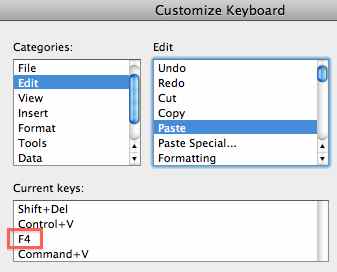
Excel Mac F4 Keyboard Shortcut

Overkill, don't you think? So I'm thinking the F4 button can be reassigned with no problems, unless, of course, you're in the habit of using the F4 key for the Paste command.

Reassign the F4 button in Excel for Mac

  • Select the Tools menu, and click Customize Keyboard...
  • In the Categories: box select Edit
  • In the Edit box, select Redo
  • Select the Press new shortcut key: box
  • Press the keyboard combination fn+F4 key (or just F4 key if you've setup the Mac function keys normally)
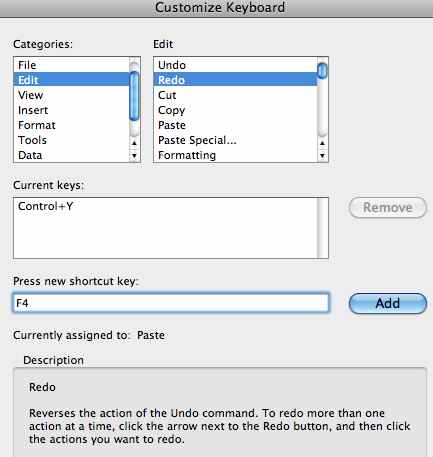
Reassign the F4 key in Excel for Mac

  • Click Add

Confirm F4 Change

  • Click OK to reassign the Paste command to the Redo command.
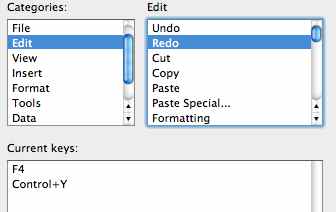
F4 key reassigned

The Excel F4 button will now work with the Redo command, which is similar to how Excel for Windows is setup.

Note: You have to make this change to each version of Excel for Mac. For instance the above procedure was done in Excel 2011, but my Excel 2008 version of Excel for Mac wasn't affected and has to be done separately.

Enjoyed this guide?

Join our newsletter to get the latest Excel tips delivered to your inbox.

You can unsubscribe anytime. See our Privacy Policy.

Archived comments

Comments migrated from the previous version of the site. Adding new comments is disabled.

Select1January 29, 2011 at 07:53 PM
Unfortunately this does not work as repeat in Excel 2011. The Command Y function is not quite the same as redo (which the above process outlines how to assign F4 to Redo). I often use the F4 key (Repeat Command) in the Windows version to quickly delete rows and columns. The Command Y function (I believe Repeat Command) is not customizable - cannot be assigned using the Tools - Customize Keyboard.
Gregoryexcelsemipro.comJanuary 29, 2011 at 08:13 PM
You're right, the Cmd+6 keyboard shortcut is really the Repeat command, but since I'm use to Windows where the F4 button in Excel is either a Repeat or Redo (Cmd+Y) command, it really irks me that Excel for Mac setup F4 to be a Paste command so I wanted to change it. I wrote a new post showing how to put the the Repeat command icon on the toolbar, which works even better.
Ray DMay 3, 2011 at 05:56 PM
What about F2 for editing the contents of a cell? Is there any way to make that happen? I can't even fins a command for anything like that...
Gregoryexcelsemipro.comMay 3, 2011 at 06:07 PM
Use CONTROL+U instead of F2 in Excel for Mac. A pain in the you-know-what, but what's a fella supposed to to?
Ray DMay 3, 2011 at 06:48 PM
https://excelsemipro.com/2011/02/f2-in-excel-for-mac/ Awesome little addition to the system prefs!
SaraApril 23, 2013 at 08:14 PM
also, i just found out that if you're using a mouse, then double click in the cell = same as keyboard shortcut control+U (which is the same as the windows F2) for editing contents of a cell
Gregoryexcelsemipro.comApril 25, 2013 at 04:33 AM
Thanks for the reminder. I don't think I've mentioned that tip.
A GordonMay 29, 2011 at 03:46 AM
I normally do not comment on sites too often (extremely busy) but I had to here. YOU HAVE SAVED MY LIFE!!!! I am in the process of setting up some excel sheets for a client of mine that includes hundreds and hundreds of rows of information and changing this has saved me loads of time adding in hundreds of new information! Thank you again so much!
Saritha PeruriJuly 7, 2011 at 09:59 PM
Hey Greg, What about using F4 to lock cells (i.e., what typically allows you to toggle dollar signs in the cell). Thanks! Saritha
Gregoryexcelsemipro.comJuly 7, 2011 at 11:33 PM
Use COMMAND+T to toggle through the absolute/relative reference combinations. Or use the Switch Reference on the Formulas tab of the Ribbon.
Federico PratMay 3, 2013 at 12:00 PM
What if I want to assign F4 as a CMD+T alias? I would like F4 to act as in Windows Excel for cycling on reference types, but I cannot find the appropriate command in the dialog box for keyboard customisation.
Gregoryexcelsemipro.comMay 4, 2013 at 01:46 PM
I'm on a bit of a holiday and don't have access to my iMac, but you could pick a key and try to set the shortcut and then maybe Excel will tell you what key is reserved. Cmd+T may be a OS X shortcut so you might want to look in the Mac Preferences > Keyboard to see if the operating system would prevent you from using that keyboard combination. Sorry I couldn't be of more help.