The DATEDIF Function comes in handy when you want to know how many years, months, and days there are between two dates. And even though it may be slightly flawed, it still beats the alternatives.
How Many Years, Months and Days Has it Been?
The following spreadsheet works well for birthdays or anniversaries. The DATEDIF Function generates the Years, Months, and Days.
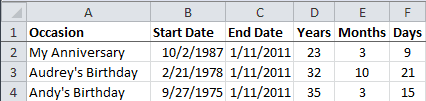
The End Date column has the formula =TODAY().
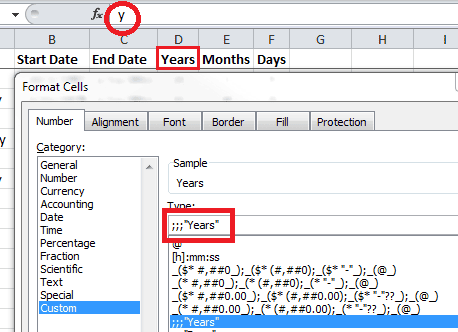
The Years heading in cell D2 has the custom format ;;;"Years" which shows the text "Years" in the spreadsheet cell while hiding the underlying value "y" that you can see in the formula bar.
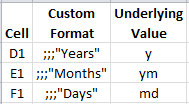
The headings for Years, Months, and Days all have a custom format. The Underlying Value is what's essential for the next section.
Using the DATEDIF Function
The DATEDIF function is present in all current versions of Excel, but is only documented in Excel 2000. It was provided for compatibility with Lotus 1-2-3.
The Syntax is:
DATEDIF(start_date, end_date, unit)
Start Date and End Date are self-explanatory, although the end date must come after start date. The Unit is the type of information you want to return.
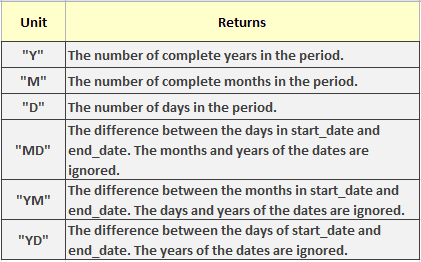
The formula in cell D2 is =DATEDIF($B2,$C2,D$1) where $B2 is the Start Date, $C2 is the End Date, and D$1 is the Unit. This gives you =DATEDIF("10/2/1987", "1/11/2011", "y") and returns 23 years.
I'm using the unit argument "ym" in the Months column to return the number of months. (That's the value in cell D1 you can't see in the spreadsheet). The unit argument is "md" for the Days column. The formulas in row 2 are:
-
Years =DATEDIF($B2,$C2,D$1) = DATEDIF("10/2/1987","1/11/2011","y")
-
Months =DATEDIF($B2,$C2,E$1) = DATEDIF("2/21/1978","1/11/2011","ym")
-
Days =DATEDIF($B2,$C2,F$1) = DATEDIF("9/27/1975","1/11/2011","md")
A Problem with DATEDIF Function
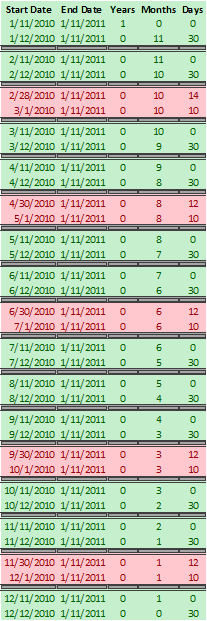
I used a column of Start Dates for the past year and noticed a pattern with the Days column. Every month in the DATEDIF Function seems to have 31 days.
The 31-Day Cycle
The first pair of dates are the 11th and 12th of 2010. The first date is one year, zero months, and zero days from 1/11/2011. The second date is zero years, 11 months, and 30 days from 1/11/2011.
The green pairs show the Days cycle from zero to 30 days, which means a 31-day cycle.
Missing Days
Now, look at the red pairs of data. These are the only non-sequential Days returned by the DATEDIF for the past year.
The first pair has start dates of 2/28/2010 and 3/1/2010. The first date is zero years, ten months, and 14 days from 1/11/2011. The second date is zero years, ten months, and ten days from 1/11/2011.
Three days are missing from this one day sequential difference.
The rest of the red data pairs skip one day, the day after a month with less than 31 days.
For the spreadsheet I've put together, this DATEDIF anomaly will not make me lose any sleep. Missing a day or two in 10 to 50 years is not very bothersome.