Converting seconds into a minutes:seconds format in Excel is easy once you split the job into minutes and leftover seconds. A classic pattern is to combine TIME, INT, and MOD so the result can be formatted as a real Excel time value instead of plain text.
Quick Answer: Convert Seconds to m:ss with TIME, INT, and MOD
If your seconds value is in A2, use:
=TIME(0,INT(A2/60),MOD(A2,60))Then format the result as m:ss or mm:ss.
We'll use three functions. (click to review prior post)
TIME(hour,minute,second)
INT(number)
MOD(number,divisor)
For the TIME Function, the three arguments are:
hour = 0
minute = INT(number)
second = MOD(number, divisor)
Which leaves us with:
TIME(0, INT(number), MOD(number,divisor))
Using 274 seconds as an example, for the INT argument: number = 274/60. The MOD arguments: number = 274, and divisor = 60. Therefore:
=TIME(0,INT(274/60),MOD(274,60))
You can see this applied below, with H2 used as a cell reference for 274, and 60 as the conversion constant.

The TIME Function Argument Dialog Box shows that the function returns 0.003171296, which is the time serial number, and the formula result is 4:34.
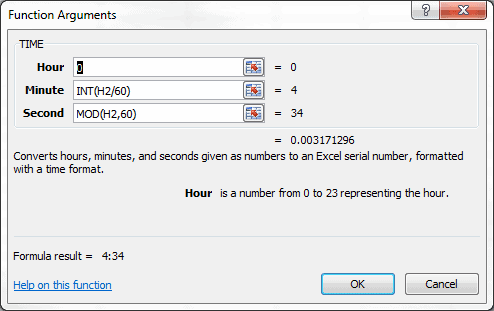
When faced with a column of data that shows Time in seconds, the TIME function is useful when combined with the INT and MOD functions. The INT function extracts the number of minutes when the Time(Sec) is divided by 60 seconds per minute, and the MOD function gives the remaining seconds, given the number of seconds and the divisor 60.
In this particular spreadsheet the Hour argument will always be zero because the data happens to be song duration from an iTunes playlist. If your source values can go above one hour, switch the cell format to [h]:mm:ss so Excel shows elapsed hours correctly.
The next post will deal with accumulating the TIME data.