Excel is a great tool for figuring stuff out, like conversions that aren't easy to do in your head. Here I'm converting minutes per mile to MPH and then reversing the process, converting MPH to minutes per mile, to create a conversion chart.
My Conversion Problem for Minutes per Mile to MPH
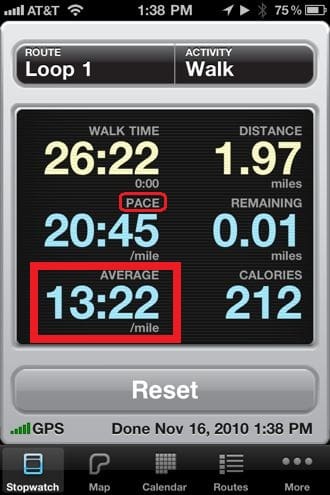
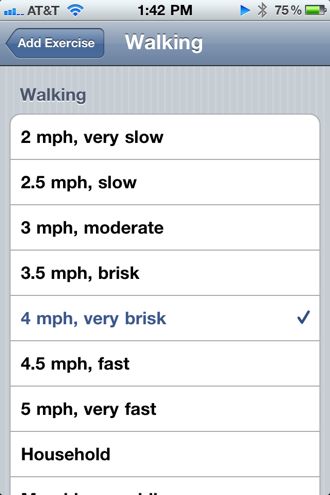
I track my Average Pace when out walking for exercise by using the iPhone App Walkmeter, then log that information into the Lose It App. The problem I have is converting my Average Pace to Miles per Hour (MPH).
Below you can see my average pace is 13:22 per mile, but Lose It wants me to pick from a list of MPH values.
Simple Conversion Equation
You can use algebra to work out how to convert Pace, in minutes per mile, to MPH.

The problem with this is that Walkmeter shows the Average Pace in Minutes and Seconds per mile, which is not decimal minutes per mile.
Converting Minutes and Seconds
There are a couple of ways to convert minutes:seconds to decimal minutes. The first mimics what I would do by using a calculator and the second is strictly an Excel thing to convert minutes per mile to MPH.
Decimal Minutes
Divide the seconds by 60 then add the result to the number of minutes to get decimal minutes.
B2 =MINUTE(A2)+SECOND(A2)/60
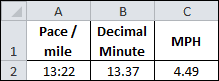
This solution uses the Excel Functions MINUTE and SECOND.
Decimal Hours
Convert 13:22 to a time serial number by using the TIME Function, then multiply by 24 to get decimal hours.
B2 =TIME(,MINUTE(A2),SECOND(A2))*24
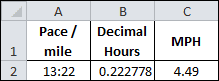
The TIME Function above has three arguments:
-
Hour, which is blank
-
Minute, which uses the MINUTE Function
-
Second, which uses the SECOND Function
Convert to MPH
Now that I've converted minutes and seconds to either decimal minutes or hours, converting Pace to MPH can be completed in a second step.
Using Decimal Minutes
Simply divide 60 min/hr by the 13.37 pace/mile to get 4.49 MPH.
C2 =60/B2
Combining equations in cells B2 and C2 gets us the conversion in one big equation:
MPH =60/(MINUTE(A2)+SECOND(A2)/60)
Using Decimal Hours
Here we simply invert the decimal hours to get our answer, one (1) divided by 0.0222778 decimal hours, gives us 4.49 MPH.
C2 =1/B2
Again, we can combine equations to get:
MPH =1/(TIME(,MINUTE(A2),SECOND(A2))*24)
MPH to Minutes per Mile Conversion
For a given set of MPH values I want to convert to minutes per mile and show the result in a minutes:seconds format. Essentially reversing what I just did above.
The simplest way to do this is to realize that the time serial number is based on seconds. We'll also use the fact that 1 hour = 3600 seconds.
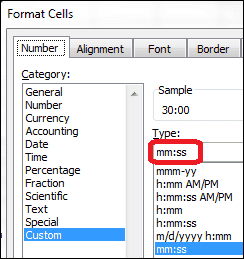
When we divide 3600 by an MPH value, it gives us the number of seconds it takes to go one mile. Plugging these seconds into the TIME Function will give us our answer, but as a time serial number. We can then use a custom format of mm:ss forthe Pace range and the conversion is complete. The equation for cell B2 is:
=TIME(,,3600/A2)
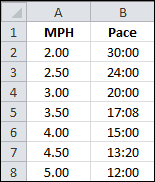
This formula works because column B is formatted using the mm:ss custom format.
So now I have a conversion chart for MPH to Pace and can probably remember that a pace of 13:22 is close to 4.5 MPH, which is helpful to me. How about you?