The TEXT Function converts a value to text and lets you specify the display formatting by using special format strings. I often use this function to show the day of the week beside a column of dates. Another common use is to format a number in a concatenated text string.
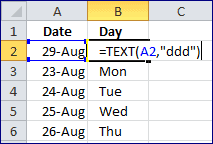 There are two arguments: value and format_text. The value argument can be a number, a formula that evaluates to a numeric value, or a reference to a cell that contains a numeric value. The format_text argument is a number format, in text form, from the Category box on the Number tab in the Format Cells dialog box. This argument has to be enclosed in quotation marks.
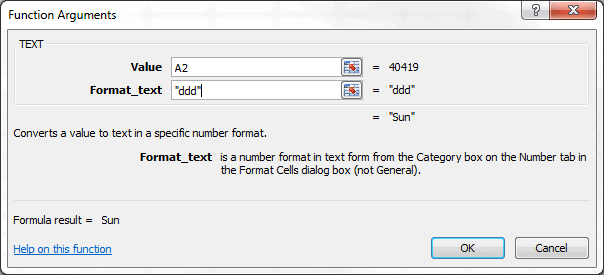
The key to using the TEXT function is knowing the format_text arguments. The best place to seek out this information is in Help. To get there, use the keyboard shortcut Shift+F3 to bring up the Insert Function dialog box, under Select a function: find and select the TEXT Function and click OK.
On the Function Arguments dialog box, click the link: Help on this function.
An example of the Help section is shown below with a small excerpt from the Guidelines for Date and Time Formats.
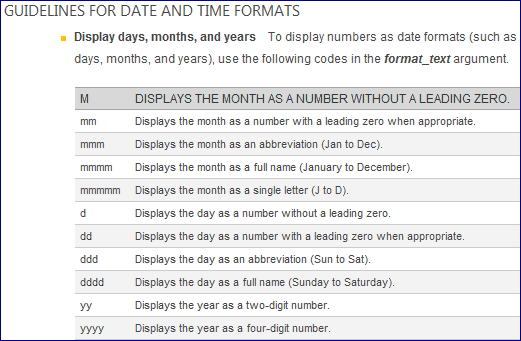
The TEXT Function Help section is a great resource to understanding how to specify the display formatting you desire.
Format a Number Inside a Text String
Another great use for the TEXT Function is inside a text string where you can format a number like you want it.
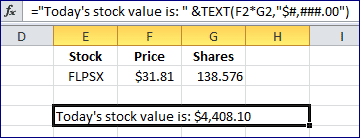
The text string Today's stock value is: is followed by the ampersand operator, then the TEXT Function. As you can see, the value argument is Price times Shares (F2*G2) and the format_ text argument is $#,###.00.
The entire result is a text string, but the TEXT Function gives currency formatting to the number value.