If you already have a start date-time and an end date-time in Excel, you usually do not need a complex formula to get total hours and minutes. In many cases you can simply subtract the two values and apply an elapsed-time format such as [h]:mm or [h]:mm:ss.
Quick Answer: Get Total Hours Between Two Date-Time Values
If the start value is in A2 and the end value is in B2, use:
=B2-A2
Then format the result cell as:
[h]:mmfor hours and minutes[h]:mm:ssfor hours, minutes, and seconds
In a previous post I went on and on about how you can calculate hours between two different dates and times, but Excel does this for you automatically. I'll use reader comment as my example.
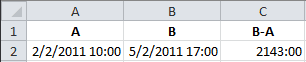
A-02.02.2011 10:00 B-05.02.2011 17:00 Please help me to find B-A in hh:mm
For clarity I will assume that the date format is m/d/yyyy, which is what I use here in the US.
For the A value type in 2/2/2011 10:00 and for the B value type in 5/2/2011 17:00 then in another cell subtract A from B. In the (B-A) cell enter the custom time format [h]:mm to show the result in hh:mm format.
To enter the custom time format:
- Open the Format Cells dialog box (CTRL+1)
- Select the Number tab
- Click Custom
- In the Type box enter [h]:mm
- Click OK
When you surround the h with a square bracket [] Excel will show hours as elapsed time. Without the square brackets the hours will only show values 0-23.
Should you want to include seconds, the custom time format would be [h]:mm:ss. To illustrate this I'll change the B value to 5/2/2011 17:15:44 and the resulting formula will show 2143:15:44.
